

Appearance
Configuring the plugin
Before you start controlling, you need to configure the plugin for the session using the settings panel.
TIP
The panel can be toggled on and off using .ia panel.
The control panel
The IA control panel activated at EGLL:
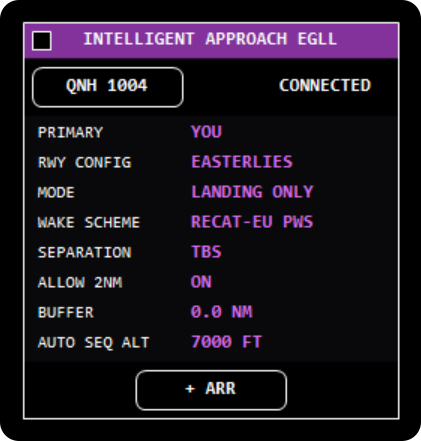
Control panel settings
- PRIMARY: the primary controller for the airport; see working with other controllers.
- RWY CONFIG: the runway configuration. Each aircraft's assigned landing runway is taken from EuroScope.
- MODE: the runway mode, which sets the default gap for new aircraft added to the sequence. Available options:
- LANDING ONLY
- MIXED 1 DEP
- MIXED 2 DEPS
- WAKE SCHEME: the wake turbulence scheme active at the airport. Available options:
- RECAT-EU PWS EGLL only
- RECAT-EU
- SEPARATION: the separation mode. Available options:
- TBS
- DBS
- BUFFER: a custom buffer added on top of the TBS or DBS target.
- AUTO SEQ ALT: the level used by the AUTO SEQ function.
Minimum radar separation
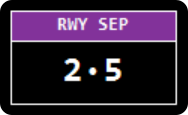
The RWY SEP panel shows the minimum radar separation permitted.
Click the left half of the panel to decrease and the right half to increase the minimum radar separation.
Global quick set
The GLOBAL QUICK SET panel is used to quickly toggle on and off user options.
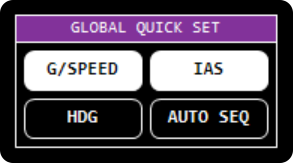
Global quick set options
- G/SPEED: toggles GS on tags.
- IAS: toggles IAS on tags.
- HDG: toggles assigned heading on tags. The real system would have Mode S data here.
- AUTO SEQ: automatically adds aircraft to the sequence when they've been cleared below the specified level on the control panel.
Tag items are toggled for all aircraft in and out of the active airport.
IAS Calculations
We don't have Mode S data from aircraft, meaning we need to estimate their IAS based on their GS and forecast wind data. Discrepancies between simulator weather and our forecast data mean this isn't always 100% accurate.